
Introduction
Describe hover, disabled, variants, themes, and responsive behavior as state maps. Tasty makes one branch win by design—without specificity fights or source-order surprises.
import { tasty } from '@tenphi/tasty';

const Button = tasty({
  as: 'button',
  styles: {
    fill: {
      '': '#primary',
      ':hover': '#primary-hover',
      ':active': '#primary-pressed',
      '[disabled]': '#surface',
    },
  },
});
Later branches have higher priority. If this button is both hovered and disabled, [disabled] wins and the hover rule is excluded. Tasty compiles that decision into mutually exclusive selectors, so the result does not depend on CSS source order.
That is the core promise: add states, variants, themes, and overrides without reopening selector logic by hand.
Tasty fits best when you are building a design system or component library whose components need to stay predictable as their state logic grows. Alongside state maps, it provides a CSS-like DSL, typed style props, tokens, recipes, sub-elements, and client-side, server-only, or build-time CSS delivery.
- Ready to try it? Follow Getting Started.
- Evaluating fit? Read Comparison and the Adoption Guide.
- Want the compiler model? Jump to How It Actually Works.
- Building a component library? See Methodology and Building a Design System.
Why Tasty
- States that don’t fight — Each property’s state map compiles into mutually exclusive selectors, so one branch wins by construction.
- Safe to extend — Add variants, overrides, and new states without re-deriving selector interactions.
- Built for component systems — Model roots and sub-elements together and expose governed, typed component APIs.
- Your design system’s language — Define tokens, units, aliases, recipes, style props, and parser rules for your system.
- One model for every state — Pseudo-classes, modifiers, root and parent states, media and container queries,
:has(), and@supportsall use state maps. - Client, server, or build time — Use
tasty()in client React, React Server Components, SSR, and static server rendering, or usetastyStatic()for framework-agnostic build-time extraction.
Supporting capabilities
- Typed style props and mod props —
stylePropsexposes selected CSS properties as typed React props (<Space flow="row" gap="2x">);modPropsdoes the same for modifier keys (<Button isLoading size="large">). Both support state maps and full TypeScript autocomplete. See Style Props and Mod Props. - Zero client styling runtime with the full React API — All
tasty()components and style functions are hook-free. In server-only rendering, they generate CSS on the server and ship no Tasty styling runtime to the browser. Astro without islands is the concrete integration; server-only Next.js RSC follows the same architecture. UsetastyStatic()when you specifically need build-time extraction without React. - Broad modern CSS coverage — Media queries, container queries,
@supports,:has(),@starting-style,@property,@keyframes,@font-face,@counter-style,@function, and more. Features that do not fit the component model (such as@layerand!important) are intentionally left out. - Performance and caching — When styles are generated in the browser, Tasty injects CSS on demand, reuses chunks aggressively, and relies on multi-level caching so large component systems stay practical.
- TypeScript-first and AI-friendly — Style definitions are declarative, structurally consistent, and fully typed, which helps both humans and tooling understand advanced stateful styles without hidden cascade logic.
Why State Maps Matter
Component styling becomes fragile when multiple selectors can win for the same property. Hover, disabled, theme, breakpoint, parent state, and root state rules start competing through specificity and source order.
Tasty replaces that competition with explicit priority in the state map. Each property compiles into mutually exclusive branches, so only one generated selector can match. For the full mechanism, jump to How It Actually Works.
Installation
pnpm add @tenphi/tastyRequirements:
- Node.js 20+
- React 18+ (peer dependency for the React entry points)
pnpm,npm, oryarn
Other package managers:
npm add @tenphi/tasty
yarn add @tenphi/tasty
Start Here
For the fuller docs map beyond the quick routes above, start here:
- Comparison — read this first if you are evaluating whether Tasty fits your team's styling model
- Adoption Guide — understand who Tasty is for, where it fits, and how to introduce it incrementally
- Getting Started — the canonical onboarding path: install, first component, optional shared
configure(), ESLint, editor tooling, and rendering mode selection - Style rendering pipeline — see the selector model behind deterministic style resolution
- Docs Hub — choose docs by role and task: React rendering, zero-client-runtime delivery, build-time extraction, design-system authoring, internals, and debugging
- Methodology — the recommended component model and public API conventions for design-system code
Quick Start
Create a styled component
import { tasty } from '@tenphi/tasty';

const Card = tasty({
  as: 'div',
  styles: {
    display: 'flex',
    flow: 'column',
    padding: '24px',
    gap: '12px',
    fill: 'white',
    color: '#222',
    border: '1px solid #ddd',
    radius: '12px',
  },
});

// Just a React component
<Card>Hello World</Card>;
Every value maps to CSS you'd recognize. This example is intentionally a simple first contact, not a tour of the whole DSL.
When you want a more design-system-shaped authoring model, Tasty also supports built-in units, tokens, recipes, state aliases, and color values such as okhsl(...) without extra runtime libraries.
Use configure() when you want to define shared tokens, state aliases, recipes, or other conventions for your app or design system. For a fuller onboarding path, follow Getting Started.
Add state-driven styles
const Button = tasty({
  as: 'button',
  styles: {
    padding: '1.5x 3x',
    fill: {
      '': '#primary',
      ':hover': '#primary-hover',
      ':active': '#primary-pressed',
      disabled: '#surface',
    },
    color: {
      '': '#on-primary',
      disabled: '#text.40',
    },
    cursor: {
      '': 'pointer',
      disabled: 'not-allowed',
    },
    transition: 'theme',
  },
});
State keys support pseudo-classes (:hover, :active), modifiers (theme=danger), attributes, media/container queries, root states, and more. The built-in disabled and checked states automatically track their corresponding native props or attributes; disabled is the concise Tasty form of [disabled]. Tasty compiles state maps into exclusive selectors automatically.
Extend any component
import { Button } from 'my-ui-lib';

const DangerButton = tasty(Button, {
  styles: {
    fill: {
      '': '#danger',
      ':hover': '#danger-hover',
    },
  },
});
Child styles merge with parent styles intelligently — state maps can extend or replace parent states per-property.
Optional: configure shared conventions
import { configure } from '@tenphi/tasty';

configure({
  states: {
    '@mobile': '@media(w < 768px)',
    '@tablet': '@media(w < 1024px)',
    '@dark':
      '@root(schema=dark) | (!@root(schema) & @media(prefers-color-scheme: dark))',
  },
  recipes: {
    card: { padding: '4x', fill: '#surface', radius: '1r', border: true },
  },
});
Use configure() once when your app or design system needs shared aliases, tokens, recipes, or parser extensions. Predefined states turn complex selector logic into single tokens, so teams can write @mobile instead of repeating media query expressions in every component.
Props as the public API
styleProps exposes selected CSS properties as typed React props, and modProps does the same for modifier keys. Together they let design systems define a governed, typed component API without wrapper elements or styles overrides:
<Space flow="row" gap="2x" placeItems="center">
  <Button isLoading size="large" placeSelf="end">
    Submit
  </Button>
</Space>
See Style Props and Mod Props below, or the full reference in React API.
Choose a Styling Approach
Once you understand the component model, choose where Tasty should generate CSS. Zero-runtime delivery is an outcome, not a synonym for tastyStatic().
| Approach | Authoring API | CSS is generated | Tasty runtime in the browser | Best for |
|---|---|---|---|---|
| Server-only React | tasty(); optional @tenphi/tasty/ssr/* | During server or static rendering | None | Astro without islands, server-only RSC, SSG |
| Hydrated React | tasty() plus @tenphi/tasty/ssr/* | During SSR, then on demand in React | Only in hydrated components | Interactive React apps, Next.js client components, Astro islands |
| Build-time extraction | tastyStatic() from @tenphi/tasty/static | During the build | None in file mode | Non-React frameworks or CSS that must be extracted before rendering |
The first approach and tastyStatic()'s default file mode both ship zero Tasty styling runtime to the browser. The difference is authoring and timing: server-only tasty() retains styleProps, sub-elements, variants, and the rest of the React API, while tastyStatic() extracts build-time-known styles without a React dependency. (tastyStatic() inject mode intentionally ships a tiny CSS injector.) Astro supports the server-only path directly with tastyIntegration({ islands: false }); the same server-only model applies to Next.js RSC, though you should verify the output for your deployment. See Getting Started, Build-Time Extraction, and Server-Side Rendering.
How It Actually Works
This is the core idea that makes everything else possible.
For the end-to-end architecture — parsing state keys, building exclusive conditions, merging by output, and materializing selectors and at-rules — see Style rendering pipeline.
The structural problem with normal CSS
First, the cascade resolves conflicts by specificity and source order: when multiple selectors match, the one with the highest specificity wins, or — if specificity is equal — the last one in source order wins. That makes styles inherently fragile. Reordering imports, adding a media query, or composing components from different libraries can silently break styling.
A small example makes this tangible. Two rules for a button's background:
.btn:hover {
  background: dodgerblue;
}
.btn[disabled] {
  background: gray;
}
Both selectors have specificity (0, 2, 0). When the button is hovered and disabled, both match — and the last rule in source order wins. Swap the two lines and a hovered disabled button silently turns blue instead of gray. This class of bug is invisible in code review because the logic is correct; only the ordering is wrong.
Why real state logic is hard to author by hand
Authoring selectors that capture real-world state logic is fundamentally hard. A single state like "dark mode" may depend on a root attribute, an OS preference, or both — each branch needing its own selector, proper negation of competing branches, and correct @media nesting. The example below shows the CSS you'd write by hand for just one property with one state. Scale that across dozens of properties, then add breakpoints and container queries, and the selector logic quickly becomes unmanageable.
What Tasty generates instead
Tasty solves both problems at once: every state mapping compiles into mutually exclusive selectors.
const Text = tasty({
  styles: {
    color: {
      '': '#text',
      '@dark': '#text-on-dark',
    },
    padding: {
      '': '4x',
      '@mobile': '2x',
    },
  },
});
If @dark expands to @root(schema=dark) | (!@root(schema) & @media(prefers-color-scheme: dark)), try writing the CSS by hand. A first attempt might look like this:
/* First attempt — the @media branch is too broad */
.t0 {
  color: var(--text-color);
}
:root[data-schema='dark'] .t0 {
  color: var(--text-on-dark-color);
}
@media (prefers-color-scheme: dark) {
  .t0 {
    color: var(--text-on-dark-color);
  }
}
The @media branch fires even when data-schema="light" is explicitly set. Fix that:
/* Second attempt — @media is scoped, but the default is still too broad */
.t0 {
  color: var(--text-color);
}
:root[data-schema='dark'] .t0 {
  color: var(--text-on-dark-color);
}
@media (prefers-color-scheme: dark) {
  :root:not([data-schema]) .t0 {
    color: var(--text-on-dark-color);
  }
}
Better — but the bare .t0 default still matches unconditionally. It matches in dark mode, it matches when data-schema="dark" is set, and it can beat the attribute selector by source order if another rule re-declares it later. There is no selector that says "apply this default only when none of the dark branches win."
This is just one property with one state, and getting it right already takes multiple iterations. The correct selectors require negating every other branch — which is exactly what Tasty generates automatically:
/* Branch 1: Explicit dark schema */
:root[data-schema='dark'] .t0.t0 {
  color: var(--text-on-dark-color);
}

/* Branch 2: No schema attribute + OS prefers dark */
@media (prefers-color-scheme: dark) {
  :root:not([data-schema]) .t0.t0 {
    color: var(--text-on-dark-color);
  }
}

/* Default: no schema + OS does not prefer dark */
@media (not (prefers-color-scheme: dark)) {
  :root:not([data-schema='dark']) .t0.t0 {
    color: var(--text-color);
  }
}

/* Default: schema is set but not dark (any OS preference) */
:root:not([data-schema='dark'])[data-schema] .t0.t0 {
  color: var(--text-color);
}
What guarantee that gives you
Every rule is guarded by the negation of higher-priority rules. No two rules can match at the same time. No specificity arithmetic. No source-order dependence. Components compose and extend without collisions.
By absorbing selector complexity, Tasty makes advanced CSS patterns practical again — nested container queries, multi-condition @supports gates, and combined root-state/media branches. You stay in pure CSS instead of relying on JavaScript workarounds, so the browser can optimize layout, painting, and transitions natively. Tasty keeps the solution in CSS while removing much of the selector bookkeeping that is hard to maintain by hand.
Capabilities
This section is a quick product tour. For the canonical guides and references, start from the Docs Hub.
Design Tokens and Custom Units
Tokens are first-class. Colors use #name syntax. Spacing, radius, and border width use multiplier units tied to CSS custom properties:
fill: '#surface',         // → var(--surface-color)
color: '#text.80',        // → 80% opacity text token
padding: '2x',            // → calc(var(--gap) * 2)
radius: '1r',             // → var(--radius)
border: '1bw solid #border',| Unit | Maps to | Example |
|---|---|---|
x | --gap multiplier | 2x → calc(var(--gap) * 2) |
r | --radius multiplier | 1r → var(--radius) |
bw | --border-width multiplier | 1bw → var(--border-width) |
ow | --outline-width multiplier | 1ow → var(--outline-width) |
cr | --card-radius multiplier | 1cr → var(--card-radius) |
Define your own units via configure({ units: { ... } }).
State System
Every style property accepts a state mapping object. Keys can be combined with boolean logic:
| State type | Syntax | CSS output |
|---|---|---|
| Data attribute (boolean modifier) | disabled | [data-disabled] |
| Data attribute (value modifier) | theme=danger | [data-theme="danger"] |
| Pseudo-class | :hover | :hover |
| Attribute selector | [role="tab"] | [role="tab"] |
| Class selector (supported) | .is-active | .is-active |
| Media query | @media(w < 768px) | @media (width < 768px) |
| Container query | @(panel, w >= 300px) | @container panel (width >= 300px) |
| Root state | @root(schema=dark) | :root[data-schema="dark"] |
| Parent state | @parent(theme=danger) | :is([data-theme="danger"] *) |
| Feature query | @supports(display: grid) | @supports (display: grid) |
| Entry animation | @starting | @starting-style |
Combine with & (AND), | (OR), ! (NOT), ^ (XOR):
fill: {
  '': '#surface',
  'theme=danger & :hover': '#danger-hover',
  '[aria-selected="true"]': '#accent-subtle',
}
Sub-Element Styling
Compound components can style inner parts from the parent definition with capitalized keys in styles and optional elements declarations, producing typed sub-components like <Card.Title /> instead of separate wrapper components or ad hoc class naming.
Sub-elements share the root state context by default, so keys like :hover, modifiers, root states, and media queries resolve as one coordinated styling block. Use @own(...) when a sub-element should react to its own state, and use the $ selector affix when you need precise descendant targeting.
See React API - Sub-element Styling, Style DSL - Advanced States, and Methodology.
Style Props
styleProps exposes selected CSS properties as typed React props. Components control which properties to open up; consumers get layout and composition knobs without styles overrides. Supports state maps for responsive values.
const Space = tasty({
  styles: { display: 'flex', flow: 'column', gap: '1x' },
  styleProps: FLOW_STYLES,
});

<Space flow="row" gap={{ '': '2x', '@tablet': '4x' }}>
See React API - Style Props and Methodology - styleProps.
Mod Props
modProps exposes modifier keys as typed React props — the modifier equivalent of styleProps. Accepts an array of key names or an object with type descriptors (Boolean, String, Number, or enum arrays) for full TypeScript autocomplete.
const Button = tasty({
  as: 'button',
  modProps: { isLoading: Boolean, size: ['sm', 'md', 'lg'] as const },
  styles: {
    fill: { '': '#primary', isLoading: '#primary.5' },
    padding: { '': '2x 4x', 'size=sm': '1x 2x' },
  },
});

<Button isLoading size="lg">
  Submit
</Button>;
See React API - Mod Props and Methodology - modProps.
Variants
Variants let one component expose named visual versions without pre-generating a separate class for every possible combination. With tasty(), Tasty emits only the variant CSS that is actually used, whether rendering happens on the server or in the browser.
See React API - Variants.
Recipes
Recipes are reusable style bundles defined in configure({ recipes }) and applied with the recipe style property. They are useful when your design system wants shared state logic or visual presets without forcing every component to repeat the same style map.
Use / to post-apply recipes after local styles when recipe states should win the final merge order, and use none to skip base recipes entirely.
See Style DSL - Recipes and Configuration - recipes.
Auto-Inferred @property
Tasty usually removes the need to hand-author CSS @property rules. When a custom property receives a concrete value, Tasty infers its syntax and registers the matching @property automatically, which makes transitions and animations on custom properties work without extra boilerplate.
If you prefer explicit control, disable inference with configure({ autoPropertyTypes: false }) or declare the properties yourself.
See Style DSL - Properties (@property).
Explicit @property
Use explicit @property only when you need to override defaults such as inherits: false or a custom initialValue.
See Style DSL - Properties (@property).
CSS Functions (@function)
Define reusable, parameterized CSS functions and call them anywhere a value is accepted. Declare with $$name, invoke with $$name(...); parameters and local variables use $name.
const Card = tasty({
  styles: {
    '@function': {
      $$negative: { args: ['$value'], result: '(-1 * $value)' },
    },
    margin: '$$negative(2x) top',
  },
});
Definitions can also come from configure({ functions }) or the useFunction style function, and work across client rendering, SSR/RSC, and build-time extraction. @function is an experimental CSS feature, so for browsers that do not ship it yet enable configure({ polyfills: { functions: true } }) to inline every call into plain CSS at parse time.
See Style DSL - Functions and Configuration - Polyfills.
Style Functions
When you do not need a full component wrapper, use the style functions directly: useStyles for local class names, useGlobalStyles for selector-scoped global CSS, useRawCSS for raw rules, plus useKeyframes, useProperty, useFontFace, useCounterStyle, and useFunction for animation, custom-property, font, counter-style, and CSS-function primitives. All style functions are hook-free and work in React Server Components.
See React API - Style Functions.
Zero-Runtime Delivery
There are two ways to ship no Tasty styling runtime to the browser:
- Render
tasty()components only on the server, retaining the full React component API. Astro'stastyIntegration({ islands: false })is the clearest example. - Use
tastyStatic()to extract build-time-known CSS without React.
See Server-Side Rendering, Build-Time Extraction (tastyStatic), and Getting Started - Choosing a rendering mode.
tasty vs tastyStatic
tasty() returns React components that compute CSS during rendering. That render can happen in the browser or only on the server; the server-only path ships no Tasty styling runtime while retaining the full feature set. tastyStatic() returns class names and extracts CSS during the build via a Babel plugin, with no React dependency. Both share the same DSL, tokens, units, state mappings, and recipes. Use tasty() as the default for React; use tastyStatic() when extraction must happen before rendering or the consumer is not React.
See Build-Time Extraction (tastyStatic), React API, and Comparison - Where styles are computed.
Server-Side Rendering
tasty() components already work on the server without any SSR integration — they are hook-free and render as React Server Components by default. In server-only contexts, they ship no Tasty styling runtime while retaining the full feature set. Astro without islands is the explicit zero-client-JavaScript setup; server-only Next.js RSC follows the same architecture, with output depending on the application deployment.
SSR integration (TastyRegistry, tastyIntegration) adds CSS batching, deduplication across component trees, FOUC prevention, and client cache hydration. Use it when your app also has client-side rendering:
@tenphi/tasty/ssr/nextfor Next.js App Router (mixed server + client components)@tenphi/tasty/ssr/astrofor Astro (with or without islands)- The core SSR API for other React SSR setups
See the full SSR guide.
Entry Points
| Import | Description | Platform |
|---|---|---|
@tenphi/tasty | React style engine (tasty, style functions, configure) | Browser / Node |
@tenphi/tasty/static | Build-time extraction authoring API (tastyStatic) | Build time |
@tenphi/tasty/static/inject | Runtime helper the Babel plugin rewrites tastyStatic imports to in inject mode | Browser |
@tenphi/tasty/core | Lower-level internals (config, parser, pipeline, injector, style handlers) for tooling and advanced use | Browser / Node |
@tenphi/tasty/babel-plugin | Babel plugin for build-time CSS extraction | Node |
@tenphi/tasty/zero | Programmatic extraction API | Node |
@tenphi/tasty/zero/next | Next.js integration wrapper | Node |
@tenphi/tasty/ssr | Core SSR API (collector, context, hydration) | Node |
@tenphi/tasty/ssr/next | Next.js App Router SSR integration | Node |
@tenphi/tasty/ssr/astro | Astro integration + middleware | Node |
@tenphi/tasty/ssr/astro-client | Astro client-side cache hydration | Browser |
Browser Requirements
Tasty's exclusive selector system relies on modern CSS pseudo-class syntax:
:is()— available across all major browsers since January 2021 (MDN Baseline).- Level-4
:not()with selector lists — Chrome/Edge 88+, Firefox 84+, Safari 9+, Opera 75+. - Not supported: IE 11.
Performance
Bundle Size
All sizes measured with size-limit — minified and brotli-compressed, including all dependencies.
| Entry point | Size |
|---|---|
@tenphi/tasty (client + server rendering) | 50.19 kB |
@tenphi/tasty/core (runtime, no SSR) | 47.76 kB |
@tenphi/tasty/static (build-time authoring API) | 16.43 kB |
@tenphi/tasty/zero (programmatic extraction) | 29.6 kB |
@tenphi/tasty/babel-plugin (Babel plugin entry) | 43.7 kB |
Run pnpm size to reproduce (outputs may shift slightly with releases).
Runtime Benchmarks
Reproducible benchmarks cover the core style pipeline, the React overhead of an
empty tasty({}) wrapper, cold browser generation plus rule injection against
equivalent CSS already present on the page, and a representative 1,000-element
React update with shared styles. See
Runtime Benchmarks for the methodology, exact
results, limitations, and commands.
How It Stays Fast
- CSS is generated and injected only when styles are actually used.
- Multi-level caching avoids repeated parsing and style recomputation.
- Styles are split into reusable chunks and applied as multiple class names, so matching chunks can be reused across components instead of re-injected.
- Style normalization guarantees equivalent style input resolves to the same chunks, improving deduplication hit rates.
- A style garbage collector removes unused styles/chunks over time.
- A dedicated style injector minimizes DOM/style-tag overhead.
- Optional batched injection keeps stylesheet writes together before layout reads, allowing the browser to resolve their effects together instead of between individual insertions.
- This approach is validated in enterprise-scale apps where runtime styling overhead is not noticeable in normal UI flows.
Ecosystem
Tasty is the core of a production-ready styling platform. These companion tools complete the picture:
ESLint Plugin
@tenphi/eslint-plugin-tasty — 27 total lint rules for style property names, value syntax, token existence, state keys, and best practices. The recommended preset enables 18 of them as a practical default. Catch typos and invalid styles at lint time, not at runtime.
pnpm add -D @tenphi/eslint-plugin-tastyimport tasty from '@tenphi/eslint-plugin-tasty';
export default [tasty.configs.recommended];Glaze
@tenphi/glaze — OKHSL-based color theme generator with automatic WCAG contrast solving. Generate light, dark, and high-contrast palettes from a single hue, and export them directly as Tasty color tokens.
import { glaze } from '@tenphi/glaze';

const theme = glaze(280, 80);
theme.colors({
  surface: { lightness: 97 },
  text: { base: 'surface', lightness: '-52', contrast: 'AAA' },
});

const tokens = theme.tasty(); // Ready-to-use Tasty tokens
VS Code Extension
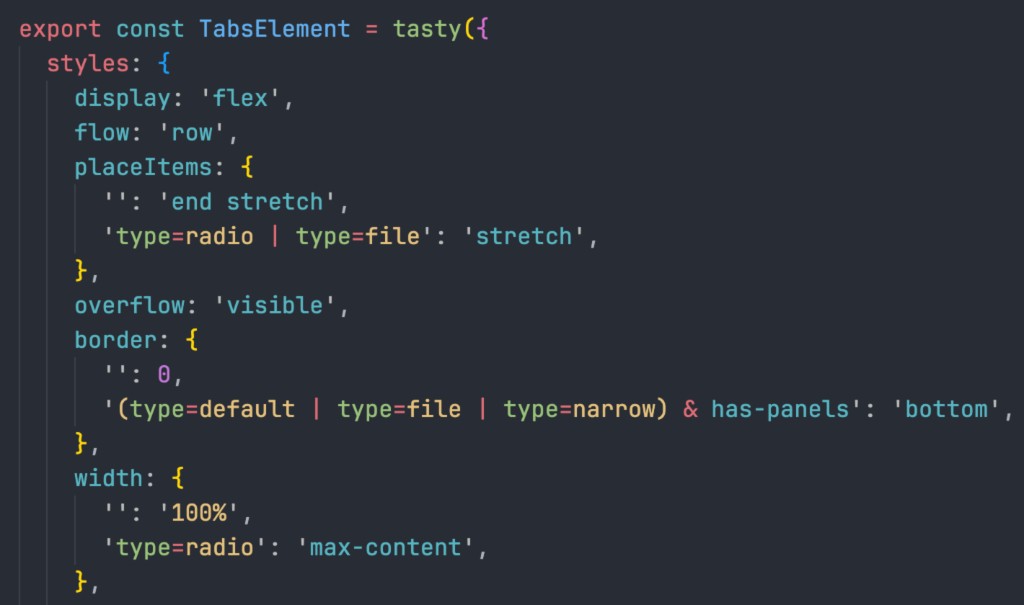
Syntax highlighting for Tasty styles in TypeScript, TSX, JavaScript, and JSX. Highlights color tokens, custom units, state keys, presets, and style properties inside tasty(), tastyStatic(), and related APIs.
Built with Tasty
tasty.style (source)
The official Tasty documentation and landing page — itself built entirely with tasty(). A showcase for server-rendered Tasty with Next.js and OKHST color theming with Glaze.
Cube Cloud
Enterprise universal semantic layer platform by Cube Dev, Inc. Cube Cloud unifies data modeling, caching, access control, and APIs (REST, GraphQL, SQL, AI) for analytics at scale. Tasty has powered its frontend for over 5 years in production.
Cube Cloud for Excel and Google Sheets
A single spreadsheet add-in deployed to both Microsoft Excel and Google Sheets. Connects spreadsheets to any cloud data platform (BigQuery, Databricks, Snowflake, Redshift, and more) via Cube Cloud's universal semantic layer.
Cube UI Kit (storybook)
Open-source React UI kit built on Tasty + React Aria. 100+ production components proving Tasty works at design-system scale. A reference implementation and a ready-to-use component library.
Documentation
Start from the docs hub if you want the shortest path to the right guide for your role or styling approach.
- Docs Hub — audience-based navigation across onboarding, design-system authoring, client and server rendering, build-time extraction, debugging, and internals
Start here
- Getting Started — Installation, first component, optional shared configuration, ESLint plugin setup, editor tooling, and rendering mode decision tree
- Methodology — The recommended patterns for structuring Tasty components: root + sub-elements, styleProps, tokens, styles vs style, wrapping and extension
Guides
- Building a Design System — Practical guide to building a DS layer: token vocabulary, state aliases, recipes, primitives, compound components, override contracts
- Adoption Guide — Where Tasty sits in the stack, who should adopt it, what you define yourself, and how to introduce it incrementally into an existing design system
Reference
- Style DSL — The Tasty style language: state maps, tokens, units, color syntax, extending semantics, recipes, keyframes,
@property,@font-face,@counter-style, and@function - React API — React-specific API:
tasty()factory, component props, variants, sub-elements, and style functions - Configuration — Global configuration: tokens, recipes, custom units, functions, polyfills, style handlers, props middleware, and TypeScript extensions
- Plugins & Extension Points — Extending Tasty: choosing an extension point, authoring style handlers and props middleware, and packaging it as a plugin
- Style Properties — Complete reference for all enhanced style properties: syntax, values, modifiers, and recommendations
- Style Rules for AI Agents — Condensed, rule-based brief for AI coding agents: correct value syntax, state maps, and property choices in one short page
Upgrading
- Migration Guide (v2 → v3) — Every breaking change in 3.0 with a search-and-replace cheat sheet: at-rule key renames, the directional-shorthand rule, config keys, renamed and removed exports, and what deliberately did not change
Rendering modes
- Build-Time Extraction (
tastyStatic) — Babel plugin setup, Next.js integration, and static style patterns - Server-Side Rendering — SSR setup for Next.js, Astro, and generic frameworks: streaming support, cache hydration, and troubleshooting
Internals
- Style rendering pipeline — How
Stylesbecome mutually exclusive CSS rules: parse → exclusives → combinations → handlers → merge → materialize (src/pipeline/) - Style Injector — Internal CSS injection engine:
inject(),injectGlobal(),injectRawCSS(),keyframes(), deduplication, reference counting, cleanup, SSR support, and Shadow DOM - Debug Utilities — Runtime CSS inspection via
tastyDebug: CSS extraction, element inspection, cache metrics, chunk breakdown, and performance monitoring
Context
- Comparison — How Tasty compares to Tailwind, Panda CSS, vanilla-extract, StyleX, Stitches, and Emotion: positioning, trade-offs, and when each tool fits best